-
SEO
- Everything You Need to Know About SEO Packages: A Simple Guide
- How Accurate Is SEMrush?
- How Does Geotargeting Work?
- How Does Semrush Calculate Traffic
- How Important Are Keywords In SEO?
- How Important Is SEO
- How Often Semrush Updates
- How To Avoid SEO Disaster During A Website Redesign
- How To Check A Competitors Website Traffic
- How To Check Keyword Competition
- How To Check Keyword Traffic
- How To Conduct Keyword Research
- How To Design SEO Friendly Website
- How To Do Keyword Research
- How To Keep SEO When Changing Website
- How To Know The Keywords Of A Website
- How To Make Your Website Seo Friendly
- How To Optimise Web Design SEO with Effective Keyword Search
- How To Redesign Website Without Losing SEO
- How To Search A Keyword On A Website
- How To Search For A Keyword On A Website
- How To SEO Your Website
- How To Use Semrush
- How To Use Semrush For Keyword Research
- SEO and Website Design
- SEO: Why Is It Important?
- Should I Translate My Website?
- The Meaning of 'Canonical' and 'Canonicalisation'
- What Are Backlinks?
- What Are Econometrics for SMEs?
- What Are The Top 5 Meta Tags?
- What Are Zero Click Search Results?
- What is 'Link Juice'?
- What is a Backlink?
- What Is A Digital Marketing Strategy
- What Is A Meta Tag?
- What Is A Site Map?
- What is Active Language?
- What Is An Hreflang?
- What Is Backlinking in SEO
- What Is International SEO?
- What Is Keyword Research And Analysis In SEO
- What Is Keyword Stuffing
- What Is Keyword Stuffing In SEO
- What Is Microsoft Clarity
- What is Passive Language?
- What Is SEMrush?
- What Is SEO
- What Is SEO Package
- What Is The Difference Between Http And Https
- What Is The Metaverse?
- Why are transition words important?
- Why Do I Need A Site Map For My Website?
- Why Do You Need SEO For Your Business
- Show Remaining Articles (39) Collapse Articles
-
Web Development
- Difference Between Wireframes and Web Layouts
- Do I Need To Design My Site With Web3 In Mind?
- Does My Site Need ISO Certification?
- How Blockchain is Changing E-commerce and Digital Marketing
- How Can I Make My Website Secure?
- How Can I Prove My Website Is Secure?
- How do I handle shipping and fulfilment efficiently?
- How Do I Improve My Website Loading Speed?
- How do Principles of Design Apply to Websites?
- How do Voice User Interfaces Work?
- How Does Geotargeting Work?
- How is website design different to other types of design?
- How To Design SEO Friendly Website
- How To Prepare Your Website For Web3
- Progressive enhancement meaning
- SEO and Website Design
- Top 5 popular web design tools
- What are content Delivery Networks? (CDNs)
- What are Functional Components in Web Design?
- What Are ISO Standards?
- What Are Micro-Interactions?
- What Are The Benefits Of Responsive Design?
- What Does 'Inspect' Feature Show Me?
- What Does 'Page Source' Mean?
- What Does Debounce Mean?
- What Does DNS Server Mean?
- What Does Mobile-First Design Mean?
- What Does Web Safe Font Mean?
- What is a dynamic web page?
- What is a headless CMS?
- What is a Schema Markup?
- What Is A Site Map?
- What is a static web page?
- What is a sticky header?
- What is a Web Domain?
- What is a Website Wireframe?
- What is Alt Text?
- What Is An Open Protocol?
- What is Augmented Reality (AR)?
- What is Energy Efficient Code?
- What Is ISO In Web Design?
- What is open source?
- What Is Parallax Scrolling Effect?
- What is Parallax Scrolling?
- What Is Responsive Design In Websites?
- What is Site Architecture?
- What is tableless web design?
- What is tag soup?
- What is the difference between AR and VR?
- What Is The Difference Between Web3 and The Metaverse?
- What is UI?
- What is UX?
- What is Virtual Reality (VR)?
- What is Web Accessibility?
- What Is Web Analytics
- What is Web Design?
- What is Web Readability?
- What Is Web3?
- What Is Website Architecture
- What’s the best platform for my eCommerce store?
- Why Do I Need A Site Map For My Website?
- Why do websites need a privacy policy?
- WYSIWYG meaning in coding
- Show Remaining Articles (48) Collapse Articles
-
Marketing
- A/B Testing for Email Campaigns: Best Practices
- How Do Marketing Agencies Make Money
- How Marketing Can Help Your Business
- How Much Does Digital Marketing Increase Sales
- How To Add Tidio To Website
- How To Get Tiktok Shop
- Mastering Digital Marketing: A Straightforward Guide for Every Business
- PPC Management in London
- PPC Services in London
- What Are Responsive Search Ads
- What Is 'Legitimate Interest'?
- What is a CTA in Marketing?
- What Is A Digital Marketing Strategy
- What is a DNS server?
- What Is A Marketing Mix Model?
- What Is A PPC Agency
- What Is Ad Retargeting
- What Is Digital Marketing
- What is EGC?
- What is GMB?
- What Is Omnichannel Marketing Strategy
- What is online reputation management (OMR)?
- What Is Performance Max
- What Is Tidio Chat Used For
- What is UGC?
- Show Remaining Articles (10) Collapse Articles
-
Social Media
- How Do Facebook Ads Work
- How does Facebook Marketplace Work?
- How Does Facebook Work
- How Does Facebook Work For Business
- How Long Does It Take For Facebook Ads To Work
- How Many Tiktok Shops Can You Have
- How Much Do Facebook Ads Cost
- How Powerful Social Media Is
- How To Add Amazon Link To Tiktok
- How To Become A Tiktok Shop Affiliate
- How To Get Tiktok Shop
- How To Grow On Instagram
- How To Grow Your Business On Tiktok
- How To Make Money On Tiktok
- How To See Facebook Ads Of Competitors
- How To Use Tiktok For Business
- Social Media Management in London
- What Does Commission Paid Mean On Tiktok
- What Is A Digital Marketing Strategy
- What Is Social Media Listening
- What Is Social Search
- Show Remaining Articles (6) Collapse Articles
-
Analytics
-
Affiliate Marketing
- How Many Affiliate Marketers Are There In The World
- How Much Do Affiliate Marketers Make
- How To Become A Tiktok Shop Affiliate
- How To Create A Website For Affiliate Marketing
- How To Find Affiliate Marketers
- How To Make Affiliate Marketing Website
- How To Promote Affiliate Links
- How To Promote Affiliate Links
- What Is Affiliate Marketing?
-
E-Commerce
- How Can I Drive More Traffic to My eCommerce store?
- How Can I Make My Website Secure?
- How can I reduce cart abandonment?
- How Can I Use SEO to Boost my Store’s Visibility?
- How Do I Improve My Store’s Conversion Rate?
- How do I optimise my store for mobile users?
- How To Prepare Your Website For Web3
- What Are The Best Tools for Managing Inventory?
- What eComm Payment Gateways Should I Use?
- What Is A Blockchain?
- What is Cost of Goods Sold (COGS) in e-Commerce?
- What Is The Best Way to Manage Customer Reviews and Feedback?
How Can I Prove My Website Is Secure?
In today’s online world, being able to prove your website is secure is essential for protecting your users’ personal information and maintaining your business’s credibility. With cyber attacks on the rise, it’s more important than ever to make sure your website is secure. But how can you show your users that your site is safe?
Here are some simple steps to prove your website is secure:
Use SSL encryption
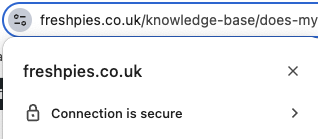
SSL (Secure Sockets Layer) encryption protects the data sent between your website and your users, making it much harder for hackers to steal information. You can show your site is secure by displaying the padlock icon in the browser’s address bar. This gives users peace of mind that their data is safe while browsing your site.
Keep your site updated
Regularly updating your website’s software and plugins is vital. Hackers often target sites with outdated software, so making sure everything is up to date helps protect your site from attacks.
Display trust seals
Showing security badges or certifications, like ISO certification, from reputable security companies lets users know your site has been checked and verified as secure.
Run regular security audits
Carrying out security checks and vulnerability scans helps you spot any weaknesses in your website before hackers can take advantage of them. This ensures your site stays secure.
Use strong passwords and multi-factor authentication
Enforcing strong passwords and using multi-factor authentication (like a code sent to a phone) adds extra layers of security, showing users that you take their safety seriously.
Provide clear privacy policies
Make sure your website has clear and easy-to-understand privacy policies and terms of service. This builds trust and shows that you’re committed to protecting users’ data.
To sum up, to prove your website is secure you can take some technical steps, and stick to basic common sense, keeping it up to date, and being clear with your users. By doing this, you can reassure visitors that their information is safe and prove your website is secure and trustworthy.